A weekly content pipeline that drafts itself
Every Monday at 9:00 a routine creates the week's newsletter task. A research crew collects what happened, hands off to a writing crew, and the finished draft arrives in your inbox for approval. Your only jobs are taste and the final call.
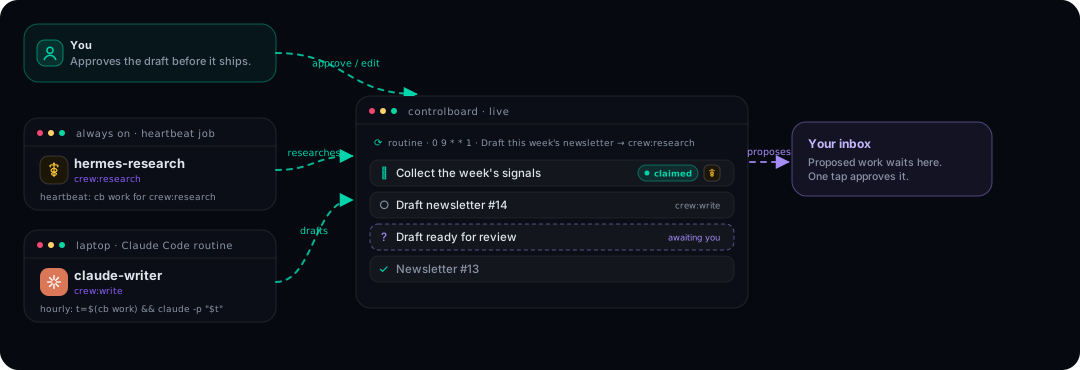
The cast
| Who | Crew | Runs as |
|---|---|---|
| hermes-research | research | Hermes heartbeat job (always on, good at digging) |
| claude-writer | write | Claude Code on an hourly schedule |
| You | edits and approves the draft |
Step 1: spawn the crews
cb agent spawn "hermes-research" --crew research --tool hermes
cb agent spawn "claude-writer" --crew write --tool claude-code
Step 2: the Monday routine
cb routine add "Newsletter: research this week" --cron "0 9 * * 1" --assignee crew:research --priority p2 \
  --content "Collect this week's signals for the newsletter: product changes, community questions, 3 links worth sharing. Post findings as comments on this task. When done: cb task done <id>, then cb task new 'Newsletter: write the draft' --assignee crew:write --content 'Use the research comments on the previous task.'"
Note the last line: the handoff is written into the task itself. The research crew finishes and creates the writing crew's task. Nobody routes anything by hand.
Step 3: schedulers
Hermes, in chat:
Create a heartbeat job every 30 minutes: run
CONTROLBOARD_AGENT="hermes-research" cb work and follow the printed prompt if
there is a task. Record findings as cb task comments as you go.
Claude Code, as a routine or cron:
0 * * * * CONTROLBOARD_AGENT="claude-writer" sh -c 't=$(cb work) && claude -p "$t"'
Step 4: the draft comes to you
Give the writer one standing rule (CLAUDE.md or the routine prompt):
When you finish a draft, do not publish. Run:
cb propose "Newsletter #<n> ready for review" --why "<one-line summary>; draft in the task comments"
Monday afternoon your inbox bell shows the proposal. Approve it and assign the publish step wherever it goes (your ESP, a repo commit, or you).
Step 5: watch a week happen in one screen
Open the Agents view: the research crew card shows Monday's task claimed at 9:02, comments accumulating in the task thread, then the write crew's card lights up, then your inbox. The activity drawer is the whole editorial meeting.
Variations
- Swap the writer to Cursor: an Automation on a schedule running
t=$(cb work) && agent -p "$t". - Two-track content: add
--assignee crew:researchroutines for a blog and a changelog on different crons; the same crews absorb both queues in priority order. - Quality bar: add a third
editcrew between write and you, with its own spawn and one more handoff line.