Coordinate customer email and outreach
Not a dev workflow. An always-on inbox crew triages support email every morning, drafts replies, and puts each send in your approval inbox. An outreach crew runs the follow-ups you approved. You wake up to work that is already done and decisions that are actually yours.
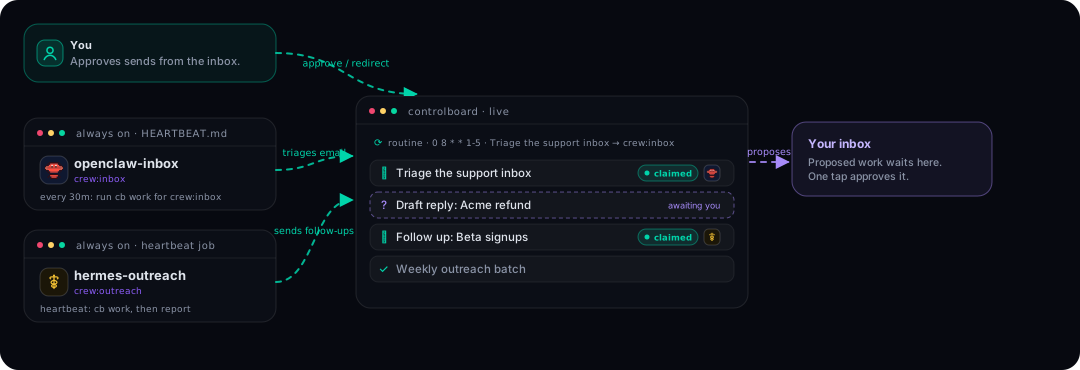
The cast
| Who | Crew | Runs as |
|---|---|---|
| openclaw-inbox | inbox | OpenClaw, always on (HEARTBEAT.md), with access to your mail |
| hermes-outreach | outreach | Hermes, always on (heartbeat job) |
| You | approves every outbound send from the inbox |
OpenClaw and Hermes are the right tools here because they are already running on your machine or server all day, and OpenClaw can also ping you on WhatsApp or Telegram when something needs you.
Step 1: spawn the crews
cb agent spawn "openclaw-inbox" --crew inbox --tool openclaw
cb agent spawn "hermes-outreach" --crew outreach --tool hermes
Step 2: the morning triage routine
cb routine add "Triage the support inbox" --cron "0 8 * * 1-5" --assignee crew:inbox --priority p1 \
  --content "Read unhandled support email. For each: reply-worthy -> draft a reply and PROPOSE it (cb propose) with the draft in the body; bug -> cb task new into the board; noise -> archive. Never send anything yourself."
Weekday mornings at 8:00 UTC the task appears; the inbox crew claims it on its next heartbeat.
Step 3: give OpenClaw the loop
Add one line to OpenClaw's HEARTBEAT.md:
- Run: CONTROLBOARD_AGENT="openclaw-inbox" cb work. If it prints a task, do
  exactly what the prompt says (it includes the cb commands to finish).
  If it prints nothing, reply HEARTBEAT_OK.
That is the entire integration. Every ~30 minutes OpenClaw checks the board.
Step 4: give Hermes the loop
Tell Hermes in chat:
Create a recurring heartbeat job, every 20 minutes: run
CONTROLBOARD_AGENT="hermes-outreach" cb work and if it prints a task, do it.
The prompt tells you how to record progress and mark it done with cb. Only
send email that the task explicitly says was approved.
Hermes' cron tool schedules it and its learning loop will refine the skill.
Step 5: the approval gate (this is the point)
The triage crew never sends. It proposes: each draft lands in your inbox
bell in the app with the draft text in the body. You read, you tap approve,
and the task becomes real work assigned to crew:outreach:
cb propose "Send: reply to Acme about the refund" --why "Drafted from their 3rd email, refund path B"
When you approve, add the assignee so the right crew picks it up, or keep a standing rule in the proposal body. Rejects are archived, recoverable, and attributed.
What you will see
By 8:15 the board shows the triage task claimed with the OpenClaw mark, two proposals waiting in your inbox, and yesterday's approved follow-ups already done and struck through. The presence chip says three agents, last active one minute ago. Your phone buzzed once, for the thing that actually needed you.